Activation Questions
Tip
Before activating Office, make sure Windows is activated.
0x80131500
This error code has no meaning, please refer to the given error message to troubleshoot the problem.
0x80131539
This error code has no meaning, please refer to the given error message to troubleshoot the problem.
0x80040154
Class not registered.
Please Repair WMI components on the Toolbox page.
0x8004100E
Invalid namespace.
Please Repair WMI components on the Toolbox page.
0x80041010
Invalid class.
Please Repair WMI components on the Toolbox page.
0x8004E108
The Software Licensing Service reported that a token in the Token Store contains an invalid hash.
Rebuild Windows Activation Token on the Toolbox page.
0x8007000D
The data is invalid.
Do the following things:
- Check your OS time is correct or not.
- Check your network connection is normal.
- Make sure the KMS host which you are using is working. How to test?
Do the following thins:
- Reset Software Protection service on the Toolbox page.
- Try activating again.
0x8007007B
The filename, directory name, or volume label syntax is incorrect.
Solution is same as 0x8007000D.
0x8007232B
DNS name does not exist.
- The KMS host is not set up, please try again after setting it up.
- As shown in the following screenshot, if
N/Ais displayed, it means that there is no KMS host configured: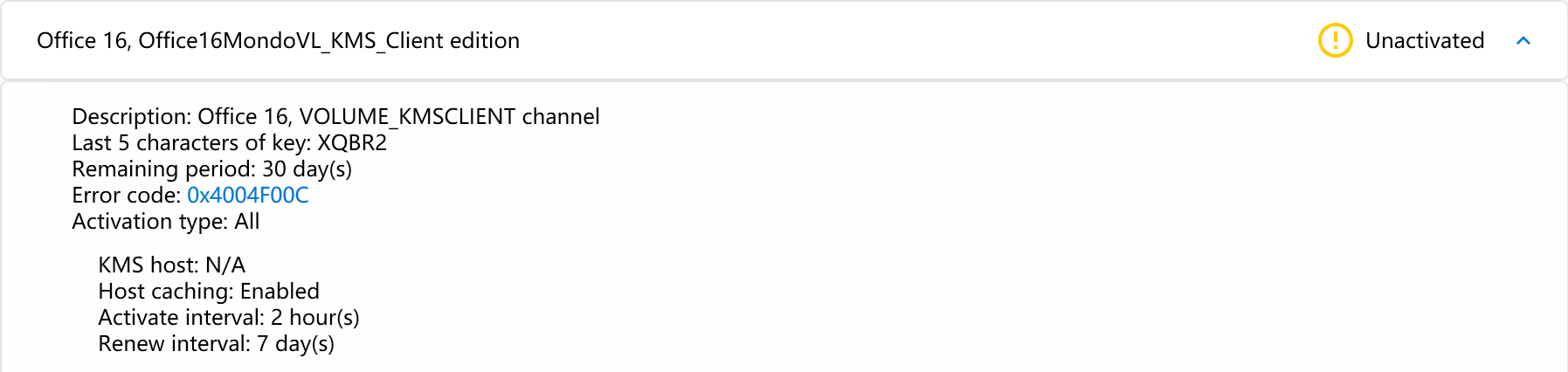
- As shown in the following screenshot, if
- The KMS host address is invalid, please check and try again.
- Try to change the DNS and try again.
- Try to connect using different Internet or Network and try again.
0x80080005
Server execution failed.
Try to reset Software Protection service on the Toolbox page and activate again.
0xC004E015
The Software Licensing Service reported that license consumption failed.
Solution is same as 0x8004E108.
0xC004F015
The Software Licensing Service reported that the license is not installed.
- Reset Software Protection service on the Toolbox page.
- Try installing Office licenses again.
0xC004F017
The Software Licensing Service reported that the license is not installed.
If your Office was activated, you can ignore the message.
If your Office is not activated, check your activation steps is correct or not make sure the Office product key is valid, or purchase Office from Microsoft.
0xC004F069
The Software Licensing Service reported that the product SKU is not found.
The Office product key you are installing does not have a corresponding license, you need to install the corresponding Office license first, and then install the product key.
0xC004F074
The Software Licensing Service reported that the product could not be activated. No Key Management Service (KMS) could be contacted.
Do the following things:
- Check your network connection is normal.
- Make sure the KMS host which you are using is working. How to test?
Do the following thins:
- Reset Software Protection service on the Toolbox page.
- Try activating again.
0xC004F075
The Software Licensing Service reported that the operation cannot be completed because the service is stopping.
Make sure the system service Software Protection (sppsvc) is running. If the service is stopped, start it manually or restart the computer.
.NET Framework problem
The native library 'C:\Windows\Microsoft.NET\Framework64\v4.0.30319\wminet_utils.dll' does not have all required functions. Please update the .NET Framework.
Please check and install all .NET Framework updates using Windows Update.
No valid Office KMS licenses were found on the system
To use KMS to activate Office, you need to install Volume licenses and GVLK for Office.
Usually, when you install the corresponding volume licenses on Office Tool Plus, you can activate it using KMS, except for the following cases:
- SPLA license: SPLA licenses can only be activated using MAK, KMS activation is not supported.
- Preview products: Products in the preview do not have the GVLK, so you need to manually install the GVLK for KMS activation.